Call Tracking: Dynamic Number Insertion and Call Sources
Call Tracking shows which marketing source generated each inbound call. It operates in two modes that can be used simultaneously:
- Dynamic Number Insertion on your website (DNI). The platform displays a dedicated phone number from your pool to each website visitor and then links the inbound call to that visitor's traffic source. Instead of simply seeing "40 calls today," you see which ad, campaign, and keyword drove each specific call.
- Offline source numbers. A dedicated phone number is permanently assigned to an off-site channel: one for Instagram, another for Telegram, and a third for a billboard or business card. There is no dynamic swapping here—the number stays fixed, and every call to it is immediately tagged with your configured source.
Each call is enriched with UTM parameters, ad platform click identifiers (gclid, yclid, fbclid), roistat, the HTTP referrer, the landing page and current page URLs, as well as the visitor's device type and browser.
What Call Tracking Is and Why You Need It
A single shared phone number across all channels makes it impossible to tell which ads actually drive phone calls—every inbound call looks identical. Call tracking solves this problem in two ways.
For website traffic:
- a visitor opens your website, and the tracking script collects information about their traffic source;
- the visitor is shown a dedicated phone number from your pool;
- the visitor calls that number;
- the incoming call is matched to the visitor's web session, and the traffic source appears in the report.
For off-site channels:
- you allocate a dedicated phone number to a specific channel and assign its source, such as
instagram; - you publish that number exclusively in that channel;
- any call to that number appears in the report under that source—without requiring scripts or web sessions.
As a result, you can accurately compare marketing channels and campaigns based on real phone calls rather than clicks alone.
How to Enable Call Tracking
By default, Call Tracking is disabled. Contact 4phone support to enable this feature for your account.
The Call Tracking page shows the current status of the feature. Once activated, you can configure all websites, number pools, and DID numbers yourself directly in the dashboard.
Configuration Components
Call Tracking is built around three core entities:
- Website. Defines the web property where number replacement runs: domain name, CSS selector for the phone number element, fallback number, assignment time-to-live (TTL), and attribution window in days.
- Number pool. A group of DID numbers. A pool serves both for dynamic number insertion on a website and as a container for offline source numbers.
- Numbers in the pool. Available DID numbers added to the pool. Each number operates in one of two modes:
| Mode | How It Works | Use Case |
|---|---|---|
| Dynamic | The platform assigns the number to website visitors in rotation in place of the static number | Online advertising and website traffic |
| Offline source | The number is permanently bound to a single channel and never shown to website visitors; it has its own source, medium, and campaign | Instagram, Telegram, billboards, business cards, directories |
A single DID number can belong to only one pool and operate in only one mode at a time. An offline source number is completely excluded from dynamic rotation—it will never be assigned to a website visitor, even if all dynamic numbers in the pool are currently busy.
Websites, pools, and numbers can be edited or deleted on the same page. Deleting any item always requires confirmation because it affects active number replacement:
| Item Deleted | What Happens |
|---|---|
| Website | Dynamic number replacement on that website stops, and visitor sessions are removed. Number pools are preserved and shown as "Unassigned" so they can be linked to another website |
| Pool | All numbers in the pool are removed from tracking and become available to be added to another pool |
| Number | The DID number remains in your account and continues receiving calls, but stops participating in call source attribution |
Attribution data for past calls is never lost: reports and call history retain the source, medium, and campaign even after a website, pool, or number is deleted. Deletion only affects future call tracking.
Step-by-Step Setup
- confirm that the platform administrator has enabled Call Tracking for your tenant;
- create a website and configure its parameters;
- create a number pool;
- add available DID numbers to the pool: dynamic numbers for website replacement and dedicated numbers for offline sources;
- install the call tracking script on your website;
- place a test call and verify the attribution report.
Step 1. Create a Website
On the Call Tracking page, add a website and fill in its parameters:
| Parameter | Description |
|---|---|
| Name | A clear display name for the website in your dashboard (required) |
| Domain | The website domain where dynamic number replacement will run (required) |
| CSS Selector | The page element containing the phone number that the script will replace with a dynamic number |
| Fallback Number | The default number displayed when no dynamic numbers are available in the pool or when call tracking is disabled |
| Assignment TTL | How long a dynamic number remains reserved for a specific visitor |
| Attribution Window | How many days an inbound call can still be matched back to a visitor's previous session |
The CSS selector must point to the HTML element where your phone number is displayed on the website. The tracking script locates this element and replaces the static phone number with a dedicated number from the pool.
Enter the domain without a protocol or path, for example example.uz or shop.example.uz. The platform automatically strips https:// and www. prefixes and rejects empty or invalid domain values. Both Name and Domain are required to create a website.
Step 2. Create a Number Pool
A pool is a set of phone numbers linked to a website. Give the pool a descriptive name: this name is also used as the campaign name when someone dials a dynamic number directly without an active web session (see the section on attribution types below).
Step 3. Add DID Numbers to the Pool
When adding a DID number to a pool, choose its operating mode.
A Dynamic number participates in website number replacement. The more concurrent visitors you expect on your website, the more dynamic numbers you need in the pool, because each dynamic number can be assigned to at most one visitor at a time.
Your pool must contain enough dynamic numbers to cover peak concurrent website visitors. If all dynamic numbers are busy, new visitors will see the fallback number and their traffic source will not be tracked.
An Offline source number is permanently assigned to an off-site channel. You configure its attribution tags directly:
| Field | Required | Example | What Appears in Reports |
|---|---|---|---|
| Source | Yes | instagram, telegram, banner | The channel that generated the call |
| Medium | No | social, offline, qr | The traffic type used to group multiple sources |
| Campaign | No | autumn-sale, bilbord-chilanzar | The specific placement or promotional campaign |
Fill in these fields using the same naming conventions as your website UTM tags so that offline channels and online ads appear side by side in unified reports for easy comparison. The Source field is required—an offline number cannot be created without it, as incoming calls would have no source to be attributed to.
Assign a separate DID number to every placement where you publish a phone number. Sharing a single number between Instagram and Telegram makes it impossible to tell which platform actually drives your calls.
You can change the mode of an existing number at any time. Switching a number from offline to dynamic clears its static source tags and returns the number to the general rotation pool.
Step 4. Install the Script on Your Website
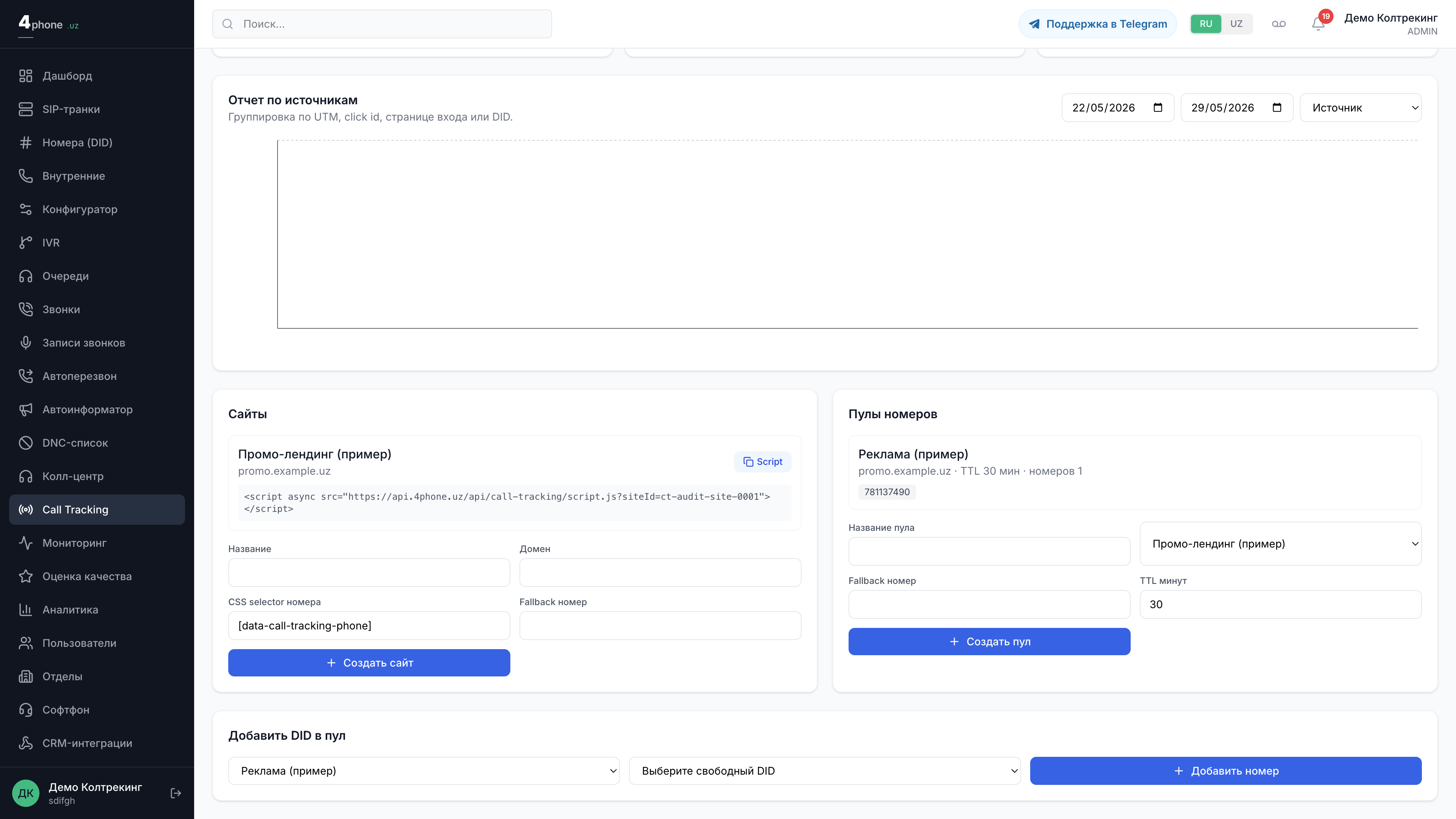
On the Call Tracking page in the dashboard, copy the ready-to-use script snippet and paste it into all pages of your website right before the closing </body> tag:
<script async src="https://api.4phone.uz/api/call-tracking/script.js?siteId=YOUR_SITE_ID"></script>
Here, siteId is the unique identifier of your website in Call Tracking. The snippet in your dashboard already includes your exact siteId, so you can copy it directly from there.
How Dynamic Number Replacement Works
When a visitor opens a page on your website, the script collects their traffic source data (UTM tags, click IDs, referrer, landing page, device type, and browser) and requests a dedicated phone number from the platform. Here is what happens next:
- Number assignment. An available dynamic number from the pool is leased to the visitor's session for the configured TTL duration. Numbers are allocated by priority. Offline source numbers never participate in this rotation.
- Repeat visits. If the same visitor requests a number again, the platform returns the same phone number and extends its TTL.
- Session heartbeat. While the browser tab remains open, the script automatically extends the visitor's session lease. When the tab is hidden in the background, lease renewals pause and automatically resume when the visitor returns to the tab.
- Collision protection. The same dynamic number is never shown to two different active visitors at the same time.
Special cases:
- All numbers busy. If no free dynamic numbers remain in the pool, the visitor is shown the fallback number. Calls to the fallback number are not linked to a web session source.
- Call tracking disabled. If the feature is turned off, the website displays the primary fallback number.
Attribution Window and Attribution Types
When an inbound call arrives on a number in a pool, the platform determines how to attribute it. The attribution rules are designed so that regular, non-advertising calls are never polluted with false marketing sources.
| Attribution Type | When It Occurs | What Appears in the Report |
|---|---|---|
| Offline source | A call arrives on a number configured as an offline source | The source, medium, and campaign configured on that number. If no campaign is set, the pool name is used. No web session is required, providing 100% accuracy |
DYNAMIC | A call to a dynamic number matches the most recent assignment of that number within the attribution window | Full source data from the visitor's web session (UTM tags, click IDs, campaign, keyword, landing page) |
STATIC | A call arrives on a dynamic number in an active pool, but no matching visitor session exists (for example, the number was dialed manually or saved earlier) | The campaign is set to the pool name; no fabricated traffic source is invented |
| No attribution | No session match is found and the number does not belong to an active pool | No attribution record is created |
For website traffic, attribution follows a last-touch model. An incoming call is linked to the most recent assignment of that phone number—even if the assignment TTL has already expired—provided the visit occurred within the configured attribution window. By default, the attribution window is 30 days and can be configured between 1 and 180 days. When a match occurs, the assignment is marked as converted.
Offline source numbers do not depend on the attribution window: because there is no website visit to match against, the source is taken directly from the number's configuration.
If a call arrives on a number that does not belong to an active pool and does not match any session, no source record is created. This is intentional: regular non-tracked calls should never receive an artificial marketing source.
Supported Traffic Sources and Parameters
Call Tracking captures a comprehensive set of attribution parameters for every call:
| Category | Parameters |
|---|---|
| UTM Parameters | source, medium, campaign, content, term |
| Click Identifiers | gclid (Google), yclid (Yandex), fbclid (Facebook), roistat |
| Visit Context | HTTP referrer, landing page URL, current page URL |
| Device Info | Device type, browser |
| Custom | Arbitrary custom parameters for end-to-end analytics |
Custom parameters are ideal for end-to-end analytics: you can pass your own custom tags into the tracking script and group calls by those tags in your reports.
Where to View Results
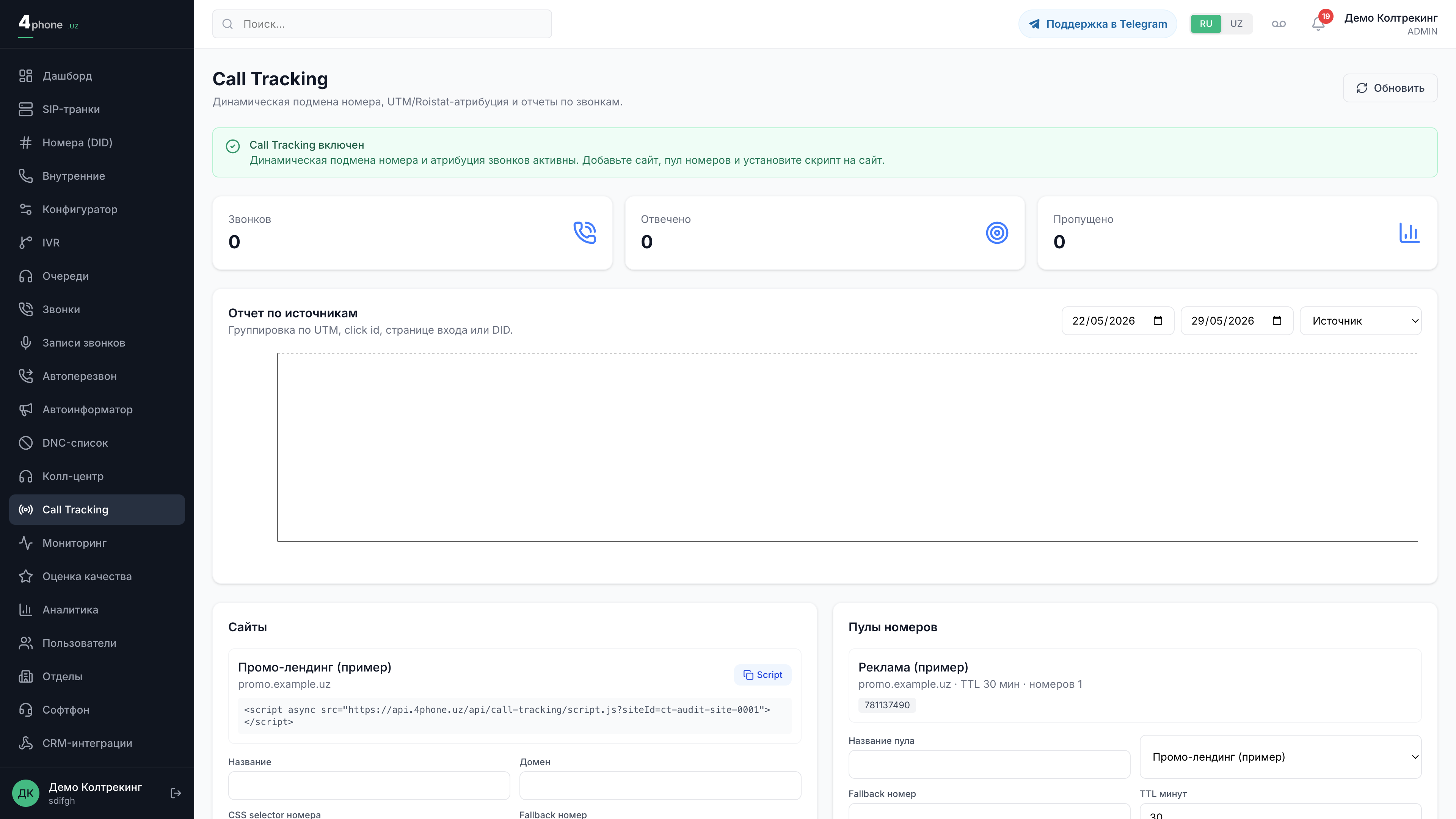
Tracked call data is available in three places:
- Call Tracking report on the Call Tracking page (
/dashboard/call-tracking). Displays total calls, answered calls, and missed calls grouped by source, medium, campaign, keyword, landing page, and DID number for the selected date range. - Call history on the Calls page (
/dashboard/calls). A badge showing the traffic source appears directly beneath the caller's phone number, and the call details drawer includes a Call Source section with the medium, campaign, keyword, and landing page. Source and campaign fields are also included when exporting call history to Excel, allowing you to see attribution right in your main call log. - CRM integrations. Call source details are automatically added to deal and lead notes in Bitrix24 and amoCRM, and exposed as amoCRM scenario variables (
tracking_source,tracking_campaign, and others). Learn more in CRM Integrations: amoCRM, Bitrix24, Webhook.
Only genuinely tracked calls—offline source numbers and calls with DYNAMIC or STATIC attribution—receive attribution tags in reports, call history, and CRM. Unmatched calls remain in your call history without a source badge, keeping your marketing analytics clean.
Marketing Integrations and End-to-End Analytics
The Call Tracking page includes a Marketing Integrations section that serves two purposes: sending offline call conversions back to advertising platforms and importing ad spend to calculate ROI. Tenants configure their own API keys and OAuth credentials; secrets are stored encrypted and are never exposed after saving.
Sending Call Conversions to Ad Platforms
When a tracked call ends, the platform automatically sends a conversion event to your connected advertising or analytics system. Only dynamically attributed calls that have the required platform identifier are sent:
| Platform | Identifier | What Is Sent |
|---|---|---|
| Google Analytics 4 | client_id from the _ga cookie | An event (default generate_lead) with currency and conversion value |
| Yandex Metrika | yclid or ClientID | An offline call conversion linked to the specified goal |
| Google Ads | gclid | An offline click conversion with duplicate protection |
In the integration settings, you can configure conversion filters: send only answered calls, require a minimum talk duration, and specify a conversion value and currency. Delivery is idempotent—each call conversion is sent to the ad platform only once.
Calls to offline source numbers are not sent to ad platforms because they do not have an online click identifier (gclid, yclid, or _ga) for the ad network to match against. However, they are always shown in full inside your 4phone reports and call history.
Use dry-run (test mode) to verify your integration settings before enabling live conversion uploads.
Ad Spend Import and ROI Analytics
For Google Ads and Yandex Direct, the platform automatically imports campaign performance data (cost, clicks, impressions) every few hours, preserving the original account currency without automatic conversion. In the End-to-End Analytics (ROI) section, ad spend is matched against tracked calls by campaign (or by google / yandex source) to calculate key metrics:
- Revenue — answered calls multiplied by the configured call value;
- Cost per Call (CPC) — total ad spend divided by the number of calls;
- Advertising Cost of Sales (ACOS / DRR) — ad spend divided by revenue, expressed as a percentage;
- ROMI — (revenue minus ad spend) divided by ad spend, expressed as a percentage.
Ad spend that does not match any calls is displayed separately as unmatched spend.
Attribution Models
You can switch between three attribution models in the report:
- Last-touch (default) — groups calls by the visitor's most recent touchpoint before calling;
- First-touch — groups calls by the first touchpoint recorded for the visitor;
- Assisted — highlights supporting channels that participated in sessions leading to converted calls.
Marketing integrations require both Call Tracking and the respective ad platform integration to be enabled and active.
Frequently Asked Questions and Limitations
- Numbers are not being replaced on the website. Verify that the platform administrator has enabled Call Tracking for your tenant, the script snippet is installed on the page, and the CSS selector matches the actual HTML element containing your phone number.
- A call has no traffic source. Either all dynamic numbers in the pool were busy when the visitor opened the site (so the fallback number was shown), or the call arrived on a DID number that is not part of an active pool.
- The call source shows the pool name instead of the ad campaign. This is
STATICattribution: the caller dialed a dynamic number without an active web session (for example, by dialing a previously saved number manually), so the pool name was assigned as the campaign. - An offline source number was shown to a website visitor. Offline source numbers are strictly excluded from website rotation. If a number appeared on your website, check its mode in the pool—it is likely still set to Dynamic.
- How to change the source of an offline number. Edit the number on the Call Tracking page. The updated source will apply to all future calls, while historical call records remain unchanged.
- Cannot create a website. Both Name and Domain are required, and the domain must be entered without a protocol or trailing slash (use
example.uz, nothttps://example.uz/).
The primary constraint for website call tracking is pool size. Because each dynamic number can be assigned to only one visitor at a time, an undersized pool will cause some visitors during traffic spikes to see the fallback number and remain unattributed. Size your dynamic number pool for peak concurrent traffic. Offline source numbers have no concurrency limit—a single DID number per offline channel can handle any volume of callers.
Next, check out How to Configure a DID Number and Route and CRM Integrations: amoCRM, Bitrix24, Webhook.